
$181.22
Add to Cart
Printpods Handheld DIY Printer Pen Logo Printing Portable Mini Printer 3500 Times Printing Android/i
More than 10 available
Details
Shipping: Australia: $4.00 (more destinations)
Condition: Brand new
*The store has not been updated recently. You may want to contact the merchant to confirm the availability of the product.


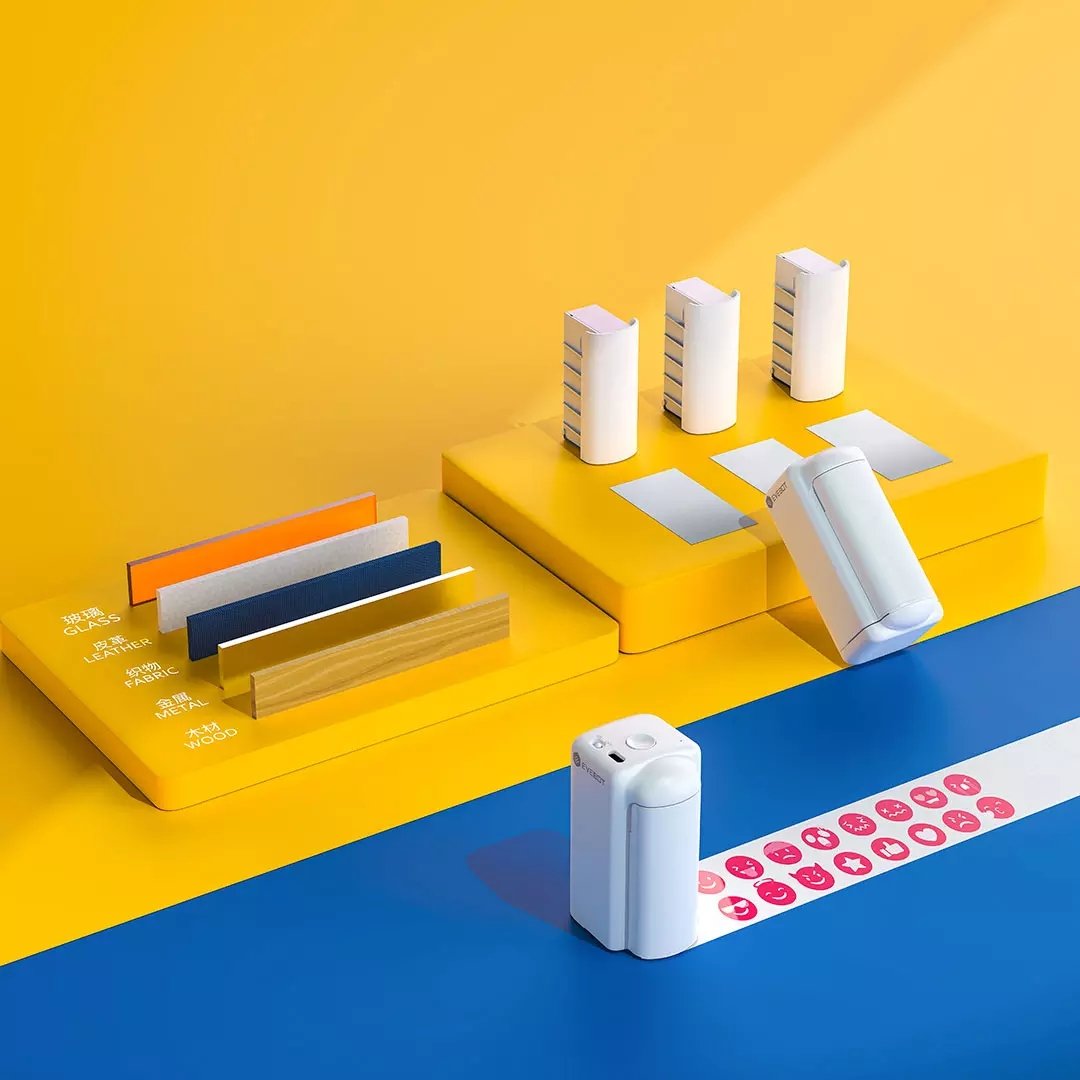
Description:This printpen is easy to print on the glossy surface such as glass with this solvent ink, which can keep for a long time even cleaning it for so many times. Specification:Size: 135 x 43 x 95mmColor: WhitePower: 500mAH, 7.4VCharging Interface: USB TYPE-CAccuracy: 300dpi (42pl Large Ink Drop)Print Head Width: 26mmBattery life: 1000 times continuous printingInk Box Capacity: 20ml(The ink cartridge is included in the package) ,Can print 10cm long logoService Life: 3500 Times (Standard Printing) Feature:1. 1s quick printing.2. You can create on any kinds of material such as canvas bags, mug or even window.3. It is easy to print on the glossy surface such as glass with this solvent ink, which can keep for a long time even cleaning it for so many times. Instructions:Step 1: Search for the PrinterPen in the APP and then connect or the device via WiFi.Step 2: Upload the image in the album or select the image in the APP and then send image to the corresponding print pen.Step 3: Press the print button to start printing after receiving the picture.
Quick Start Guide:1. Open Package and take out ink cartridge, remove the cartridge cover and blue tape.2. Insert the cartridge to printer. 3. Long press the power button for 3 seconds, the machine turns on and makes a 'beep' sound; The first indicator keeps on, the second and third indicators are flashing for WiFi connection.4. Click +, and follow the instructions on screen to connect device and your mobile phone.5. Return to main interface after connect successfully, click and enter the edit interface.6. Complete editing, click the print icon to upload onto the device, and the printer will make a 'beep' sound upon receiving the material;7. Short press power button, the fifth indicator will on. Then move the printer from left to right side, the print completed when you hear a 'beep' sound.(Note: Please Move Slowly from Left to Right)8. If the device is not in use, please insert the device into the protective cover. Package Included:1 x Printpen Main Body 1 x Ink Cartridge(Skin-friendly Ink, Black) 1 x USB Charging Cable 1 x User Manual 1 x Package Box1 x Styling agentx More Details:
Quick Start Guide:1. Open Package and take out ink cartridge, remove the cartridge cover and blue tape.2. Insert the cartridge to printer. 3. Long press the power button for 3 seconds, the machine turns on and makes a 'beep' sound; The first indicator keeps on, the second and third indicators are flashing for WiFi connection.4. Click +, and follow the instructions on screen to connect device and your mobile phone.5. Return to main interface after connect successfully, click and enter the edit interface.6. Complete editing, click the print icon to upload onto the device, and the printer will make a 'beep' sound upon receiving the material;7. Short press power button, the fifth indicator will on. Then move the printer from left to right side, the print completed when you hear a 'beep' sound.(Note: Please Move Slowly from Left to Right)8. If the device is not in use, please insert the device into the protective cover. Package Included:1 x Printpen Main Body 1 x Ink Cartridge(Skin-friendly Ink, Black) 1 x USB Charging Cable 1 x User Manual 1 x Package Box1 x Styling agentx More Details:
Other Products from lins-bay (View All)
-
$36.37
-
$16.99
-
$43.90

-
$86.84
-
$19.50
-
$33.44
-
$12.53
-
$24.66
-
$12.53
-
$34.84


 CN, Jiangsu Sheng