
$22.03
Add to Cart
2.4GHz Wifi Smart EU Plug Remote Control Outlet Wireless Home Power Socket Switch Timer
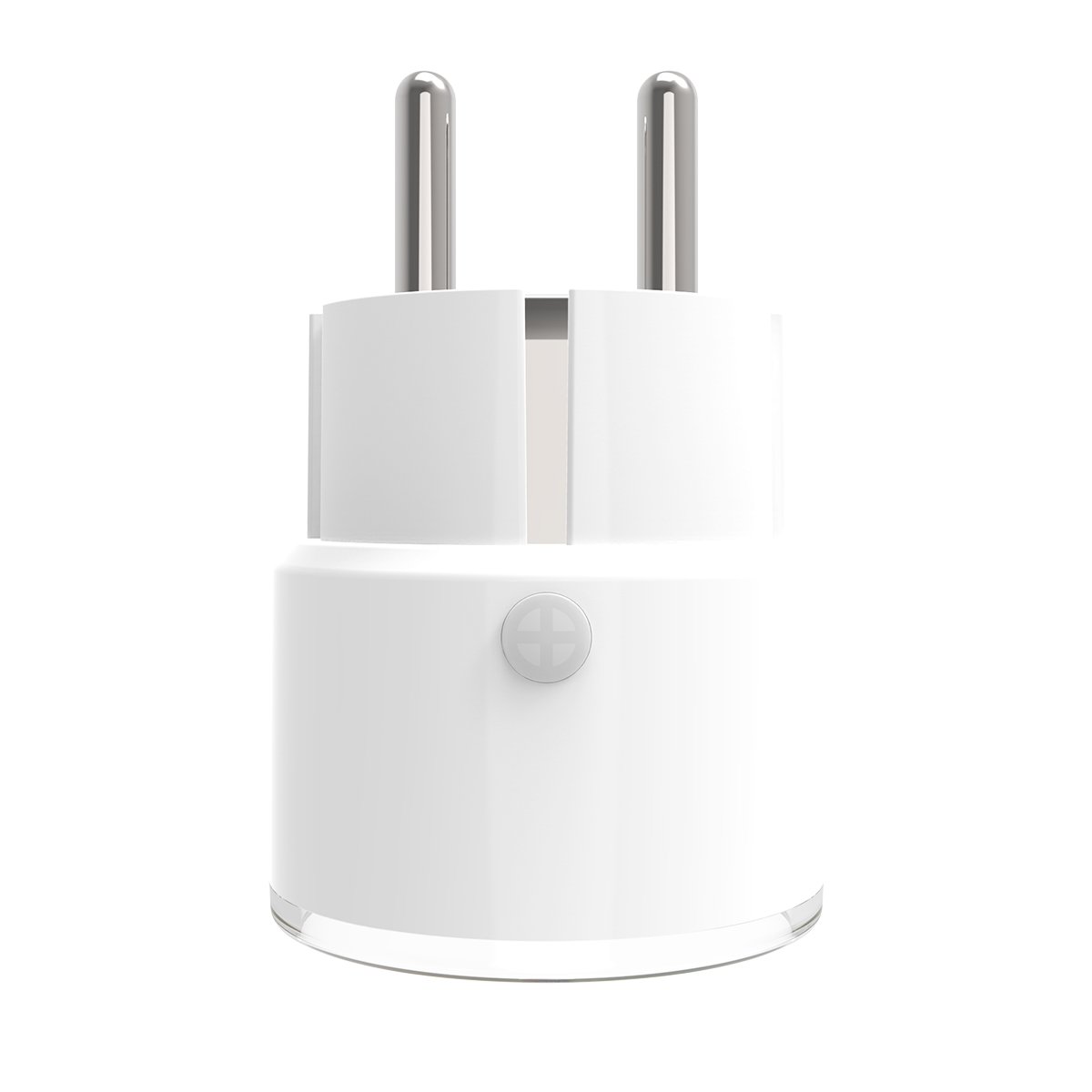
More than 10 available
Details
Shipping: Australia: $4.00 (more destinations)
Condition: Brand new
*The store has not been updated recently. You may want to contact the merchant to confirm the availability of the product.


Specification:
Rated VoltageAC110-230V士10%,50/60HzRated Current10AWireless Type10AProtocolIEE802.11b/g/nWireless Range45mOperating Temperature0°C~40°C(32F~104F)Operating Humidity20%~85%Storage Temperature0°C~60C(32F~140°F)Storage Humidity0%~90%MaterialPC/ABS(V0)Plug TypeFRFree AppTuyasmart or Smart LifeSupport systemsFor Android and For IOSProduct size(D*W*H)43x 43x 65mmLED StateDevice Status:LED State
Smart Wi-fi:Indicator flashes quickly
AP mode:Indicator flashes slowly
On:LED light on
Off:LED light off
Reset:Led will rapidly blink(the first time reset)or slowly blink(the second time reset)
Network Configuration
Smart Wifi Mode
1. Press and hold the reset button for 6s, the indicator will blink rapidly. The devices in smart Wi-fi mode.
2. Click"Confirm indicator blink rapidly
3. Configuring network base don prompt of the APP.APP Mode
1. Press the reset button for 6s again, the LED will blink slowly. The device is in AP mode.2. Click the"AP Model3. Configuring network based on prompt of the APP.How to use?
1.Connect Wifi.
2.Download App "Smart life".
3.Register and login.
4.Add device
Features:
1.2.4GHz wifi one-key connect,easy setup.
2.Plug and play farewell tedious,small size which do not take place, plug in anytime to use, easy and convenient.
3.Smartphone remote control to make appliances smarter.
4.Small compact appearance reasonable size design, optimize the internal structure, which bring you convenience, beauty and enjoyment.
5.One-Key ON/OFF appliances,smartphone remote viewing at any time, ON/OFF power supply, energy-saving electricity, smart life.
6.Timing ON/OFF smart electricity energy-saving with timing ,on/off features that can make your appliances more convenient and intelligent.
Package Included:
1 X WIFI Smart Plug
Rated VoltageAC110-230V士10%,50/60HzRated Current10AWireless Type10AProtocolIEE802.11b/g/nWireless Range45mOperating Temperature0°C~40°C(32F~104F)Operating Humidity20%~85%Storage Temperature0°C~60C(32F~140°F)Storage Humidity0%~90%MaterialPC/ABS(V0)Plug TypeFRFree AppTuyasmart or Smart LifeSupport systemsFor Android and For IOSProduct size(D*W*H)43x 43x 65mmLED StateDevice Status:LED State
Smart Wi-fi:Indicator flashes quickly
AP mode:Indicator flashes slowly
On:LED light on
Off:LED light off
Reset:Led will rapidly blink(the first time reset)or slowly blink(the second time reset)
Network Configuration
Smart Wifi Mode
1. Press and hold the reset button for 6s, the indicator will blink rapidly. The devices in smart Wi-fi mode.
2. Click"Confirm indicator blink rapidly
3. Configuring network base don prompt of the APP.APP Mode
1. Press the reset button for 6s again, the LED will blink slowly. The device is in AP mode.2. Click the"AP Model3. Configuring network based on prompt of the APP.How to use?
1.Connect Wifi.
2.Download App "Smart life".
3.Register and login.
4.Add device
Features:
1.2.4GHz wifi one-key connect,easy setup.
2.Plug and play farewell tedious,small size which do not take place, plug in anytime to use, easy and convenient.
3.Smartphone remote control to make appliances smarter.
4.Small compact appearance reasonable size design, optimize the internal structure, which bring you convenience, beauty and enjoyment.
5.One-Key ON/OFF appliances,smartphone remote viewing at any time, ON/OFF power supply, energy-saving electricity, smart life.
6.Timing ON/OFF smart electricity energy-saving with timing ,on/off features that can make your appliances more convenient and intelligent.
Package Included:
1 X WIFI Smart Plug
Other Products from lins-bay (View All)
-
$20.76

-
$20.88
-
$122.05
-
$153.34
-
$6.96
-
$12.73

-
$22.29
-
$32.05
-
$54.36
-
$57.14


 CN, Jiangsu Sheng